Comparison · Approval Flow
Approval Flow and Jira's native approvals compared
Approval Flow for Jira 3.0.0 is the production version (30 October 2026). Last updated 1 November 2026. On the Atlassian Marketplace.
We make Approval Flow for Jira. This page is neutral by rule: we take no commission from any app we compare, every statement about the other app comes from its own Marketplace listing or documentation with the date and link, and where we could not check something we say so.
This is a comparison of a built-in feature with an app. The built-in feature has real advantages, and we list them. Everything about Atlassian's feature comes from Atlassian's own pages, read on 30 October 2026. Everything about Approval Flow comes from our documentation, a live Jira Cloud test site, or the released code, and each row says which.
The short version
#- Atlassian's approvals are part of Jira on Premium and higher. If you are on that plan and the native step does what you need, you do not need an app.
- Approval Flow is for the cases the native step leaves open: a plan without approvals, or a control the native step does not offer, such as a written reason on every approval, a quorum that is a percentage, a substitute, repeating reminders, or a hash-chained audit trail.
- The two are different mechanisms. We have not tested them on the same transition.
What Atlassian's pages say
#| Topic | What the page says | Source |
|---|---|---|
| Plan | "The approvals feature is only available on Premium editions in Jira." The troubleshooting page for team-managed business projects names "Jira Cloud Premium and Enterprise licenses" | What are approvals?, Troubleshoot approvals |
| Where it attaches | "You can add an approval step to any status in a company-managed project's workflow." | What are approvals? |
| How a decision is made | "The approvers approve or decline the work item directly within Jira, adding any necessary comments or feedback." | What are approvals? |
Open requests in Atlassian's public tracker, read on 30 October 2026. Several are filed against Jira Service Management, which has its own approval feature; the column says which.
| Request | Product | Votes | Status | Open since |
|---|---|---|---|---|
| JSDCLOUD-6988: Approval steps should not bypass workflow validator | Service Management | 493 | Gathering Interest | 2018-10-16 |
| JSDCLOUD-6989: Ability to display screens on Approve/Deny Service Desk Transitions | Service Management | 744 | Gathering Interest | 2018-10-16 |
| JSDCLOUD-7867: Delegation of approval rights | Service Management | 255 | Future Consideration | 2018-12-20 |
| JSDCLOUD-8369: Approval Reminder Notification | Service Management | 296 | Gathering Interest | 2018-08-21 |
| JRACLOUD-96793: a pop-up to capture comments on Approve and Decline | Jira company-managed | 18 | Gathering Interest | 2025-11-24 |
| JRACLOUD-92893: Add a approvals feature for when releasing versions. | Jira (versions) | 185 | In Progress | 2017-10-24 |
An open request does not mean the feature is missing for your project. It means Atlassian has not closed the request. Check your own site.
What can be checked about Approval Flow
#| Capability | What the app does | How we know |
|---|---|---|
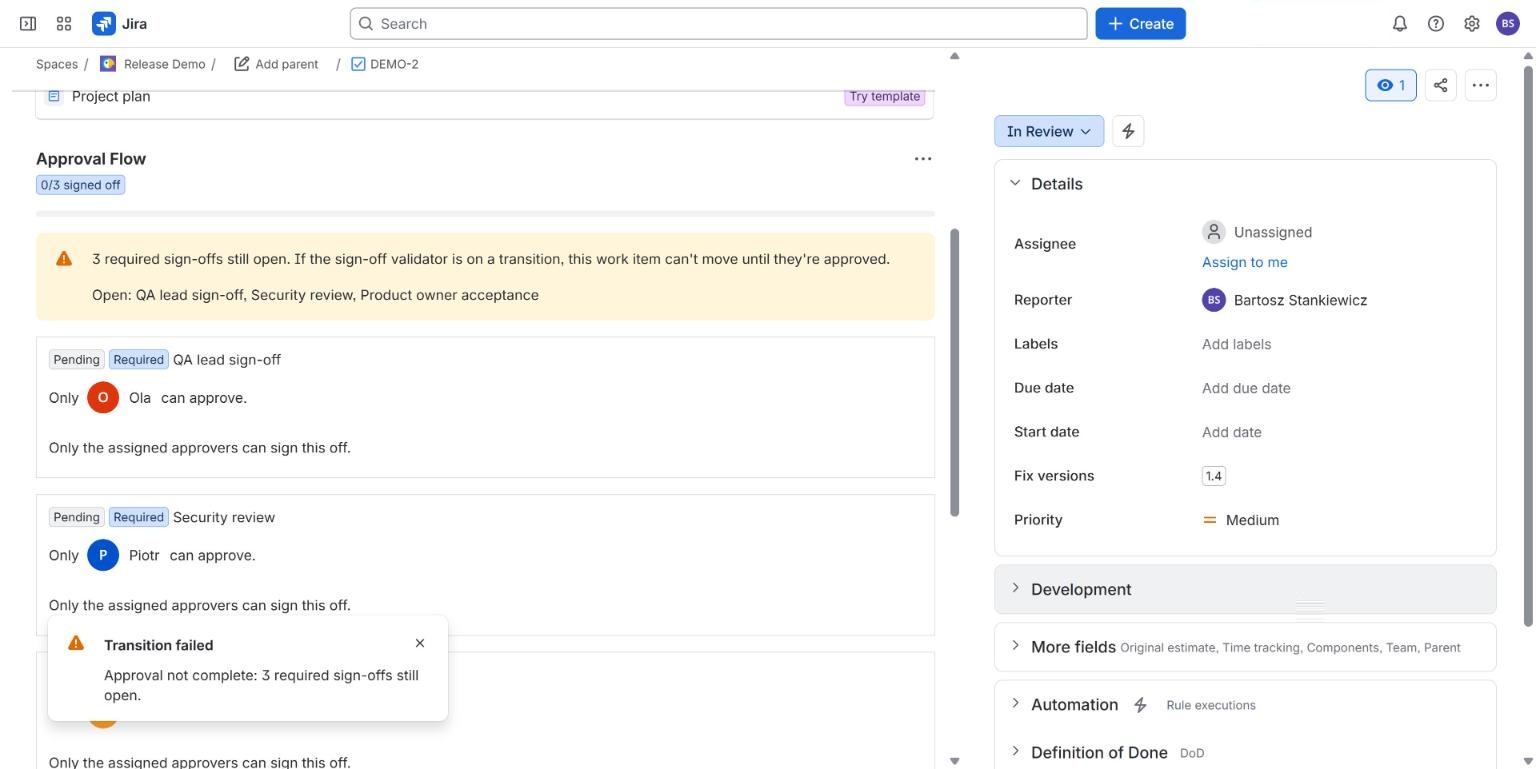
| Gate a transition | Validator Approval sign-off required blocks the transition until every Required sign-off is in; fails closed if the check cannot complete | Documentation. Block shown live on a Jira Cloud test site. Fail-closed: code only |
| Separation of duties | The person who added a requirement cannot approve it, with a message saying why | Documentation. Shown live |
| Reason to decline | Declining needs a reason, shown on the sign-off | Documentation. Shown live |
| Comment on approve | Per requirement: Approve needs a comment (paid) | Documentation. Code and tests, not shown live |
| Quorum | 1 to 10 distinct approvers, every named approver, first decision, or more than a percentage of the people who may sign (paid) | Documentation and the released code (prod-3.0.0). Not shown live |
| Substitute | One out-of-office substitute per person, with dates; the receipt says "on behalf of" | Documentation. Not shown live |
| Reminders | Repeating reminders and escalation through Jira's own notification e-mail (paid, off by default) | Documentation. Not shown live |
| Audit trail | Hash-chained log of every decision with CSV and JSON export; "Chain verified" in the panel | Documentation. Shown live |
| Signature PIN | Approvers confirm with a personal PIN (paid) | Documentation. Shown live. The authenticator-code alternative is not shown live |
| Certificate | PDF per work item (paid) | Documentation. Not shown live |
Where Atlassian's feature leads
#- It is built in. No install, no app licence, no extra permissions to review, and Atlassian supports it.
- It is part of the workflow status. Atlassian's page describes the approval step as a status in the workflow, with the work item moving on when the decision is made.
- Service Management. Native approvals are part of Jira Service Management, where requests have customers and a portal. Approval Flow has a portal view (paid) where a customer named as approver can approve or reject, with a required reason for a rejection. That is our own requirement beside the native approval step, not a replacement for it, and we have not yet shown it live with a portal-only customer. Approval Flow is built for Jira work items first.
Where the two differ
#- Plan. Native approvals depend on the plan, as quoted above. Approval Flow depends on its own licence, free up to 10 users with every feature.
- Mechanism. The native step is a workflow status. Approval Flow keeps a list of sign-offs on the work item and gates a transition with a validator.
- Evidence. Approval Flow's audit trail is a hash chain you can export and verify without our code. We have not looked for an equivalent export of native approvals, so we do not claim a difference there.
Price
#Native approvals are included in the plan that has them. Approval Flow, list prices in USD from our pricing page, annual:
| Users | Approval Flow, per year |
|---|---|
| 10 | $0 |
| 50 | $450 |
| 100 | $900 |
The difference between Jira plans is on Atlassian's pricing page; prices depend on team size, so we do not repeat them here.
How to choose
#Stay with native approvals if you are on Premium and the open requests above do not affect you. Look at Approval Flow if you are on a plan without approvals, or if one of those requests is your actual problem. Whichever you choose, test with your own workflow.
Atlassian, Jira, Confluence and Jira Service Management are trademarks of Atlassian. Other product names are trademarks of their owners and are used only to identify those products. Stanki Guild is not affiliated with, endorsed or sponsored by Atlassian or by any vendor named on this page.