Guide · Confluence
Confluence policy: owner, review date and next review
Attestation Flow for Confluence 3.1.0 is the production version (30 October 2026). Last updated 1 November 2026. On the Atlassian Marketplace.
By Bartosz Stankiewicz, founder, Stanki Guild.
A policy page needs an owner, a date it was last reviewed and a date it must be reviewed next. Confluence has no field for that on a page, and nothing that chases the owner when the date passes.
What Atlassian says
#Two requests in Atlassian's tracker ask for it, read on 30 October 2026:
| Request | Votes | Status | Open since |
|---|---|---|---|
| CONFCLOUD-1675, Add review mechanism for pages | 52 | Gathering Interest | 2004-08-13 |
| CONFCLOUD-9699, Have the ability to set expiration date for a page and notify admins of pages that are due to expire | 68 | Gathering Interest | 2007-10-12 |
The Community thread Using Confluence as a policy management platform (382 views, 7 comments) shows what people do instead. The asker lists the fields they want: Document ID, Owner, Approved By, Last Reviewed and Next Review. Replies suggest Page Properties with a report macro, Confluence Databases, or an app. One reply from an app vendor makes the limit clear: a field can hold each date, "but it won't chase down the owner, flag a policy that slipped past its review date, or hand you an audit-ready report". That is the vendor's view of a competing approach, but it names what a field cannot do.
What you can do without an app
#- Page Properties plus a report. Put Owner and Next Review in a table on every policy page, and one Page Properties Report on a hub page lists them. Good for seeing the dates.
- A database. Confluence Databases hold typed fields and can be filtered.
Where this breaks: both show a date someone typed. Nobody is reminded when it passes, and nothing records that the owner actually reviewed the page, who it was and which version they looked at.
Option: periodic review in Attestation Flow
#With a paid licence, you set Periodic review in days (30 to 1095) on a page's requirement and, optionally, up to 10 Review owners. By default the owners are the requirement owner and the Confluence page owner.
- The page box shows the next review date, or "Review overdue since", with the owners and the last review.
- A review owner clicks Reviewed, no changes with an optional note, and the signature PIN when the requirement asks for one. That is signed into the same tamper-evident log as the acknowledgements, with the page version and a checksum of its content. No new page version is created and no reader is asked again.
- The next review is due that many days after the latest of: the day the cycle was set, the last review, or the last approval of a version.
- When a review is overdue, the daily run posts one page comment as the app, mentioning the review owners, once per due date. Setting a cycle is the opt-in for that comment.
- The compliance dashboard has a Next review column and can show only pages with an overdue review. The audit evidence pack lists the review history.
Where this breaks: the reminder is one comment per due date, not a repeating chase, and the app sends no e-mail of its own. Whether a recorded review satisfies a particular standard is for you and your auditor to judge.
What we have not shown live yet
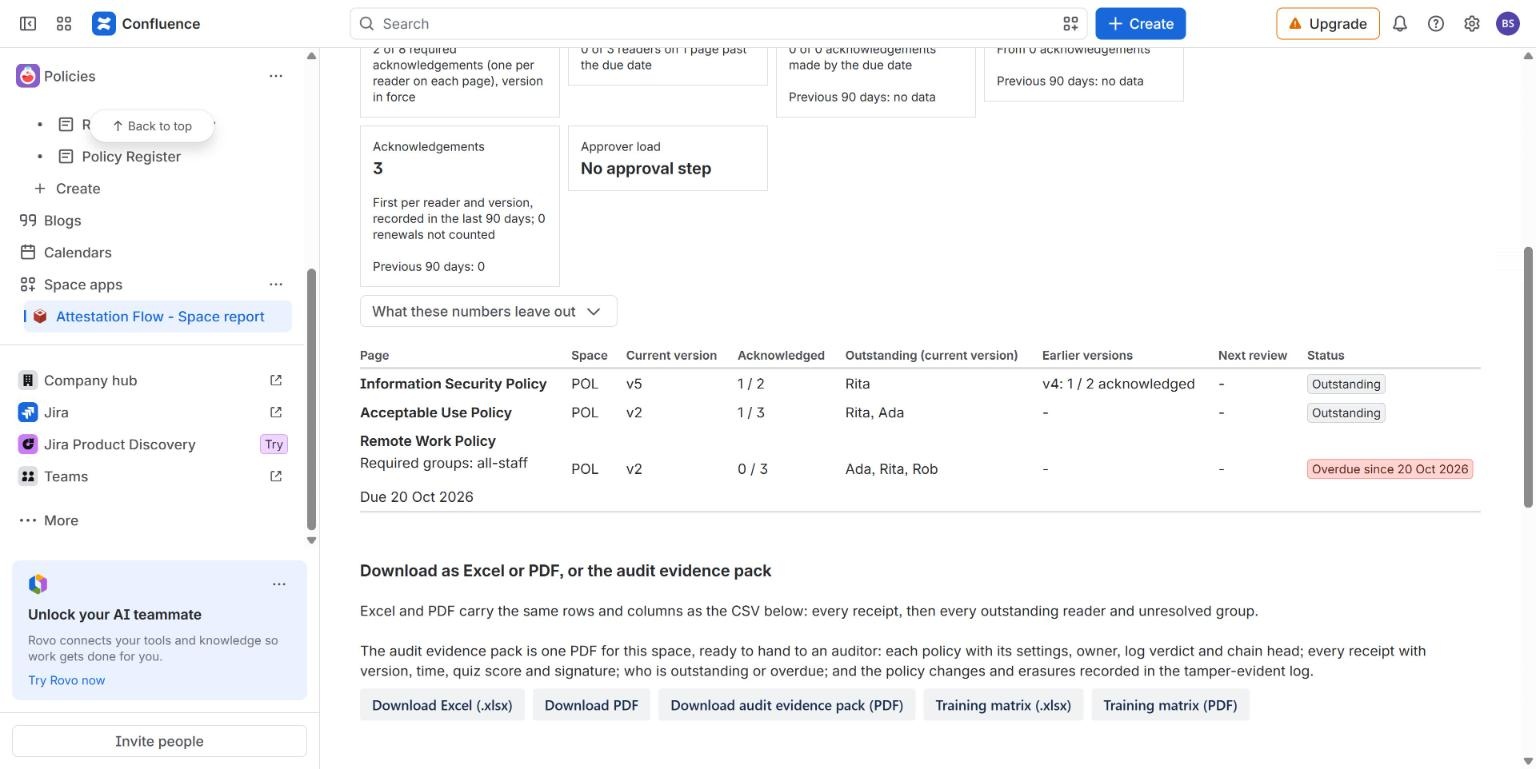
#The screenshot shows the space report with its overdue label for acknowledgements, from a live Confluence Cloud site. Periodic review itself is described in the documentation and covered by tests; we have not run it on a live site for this page, so there is no screenshot of the review box.
Common questions
#Does a review create a new page version?
No. The review is recorded in the app's log against the current version. Nothing is written to the page body.
Can I see which pages are overdue for review?
Yes, in the compliance dashboard: a Next review column and a filter for pages with an overdue review.
Related
#- Attestation Flow for Confluence documentation
- Confluence policy templates
- Attestation Flow compared with other Confluence apps
- Read and understood in Confluence: how to get proof, not just page views
- Policy acknowledgement evidence for ISO 27001 and SOC 2 audits: what to keep, and how to produce it from Confluence
- ISO 9001 documented information: showing a review in Confluence
- ISO 27001 awareness for staff: how to run a quiz, and keep the evidence
- Policy acknowledgement nudges in Slack and Microsoft Teams with Confluence Automation
- Comala Document Management alternative for Confluence: when Attestation Flow fits and when it does not
- When is "everyone has read it" actually true? Testing read and understood in Confluence