How it works · Confluence
How Attestation Flow works
Attestation Flow for Confluence 3.1.0 is the production version (30 October 2026). Last updated 1 November 2026. On the Atlassian Marketplace.
By Bartosz Stankiewicz, founder, Stanki Guild.
Attestation Flow turns a Confluence page into a page that named people must confirm they have read and understood. Each confirmation is a receipt for one version of the page: it records who, when and which version. When the page is edited, people are asked again, and the old receipt stays as history. This page walks through it twice: first as the person who sets a page up, then as the reader, and finally as the person who has to show who is outstanding. Every screenshot is from a real Confluence Cloud site running the production version, with demo data.
The app is free, with every feature, on sites with up to 10 users. Above that it costs money; the numbers are at the end of this page.
For the Confluence administrator and page owners
#1. Install it from the Marketplace
Attestation Flow for Confluence is on the Atlassian Marketplace: Attestation Flow: Read Confirmations for Confluence. Billing, trials and licences are handled by Atlassian. Installing works like this:
2. Require acknowledgement on a page
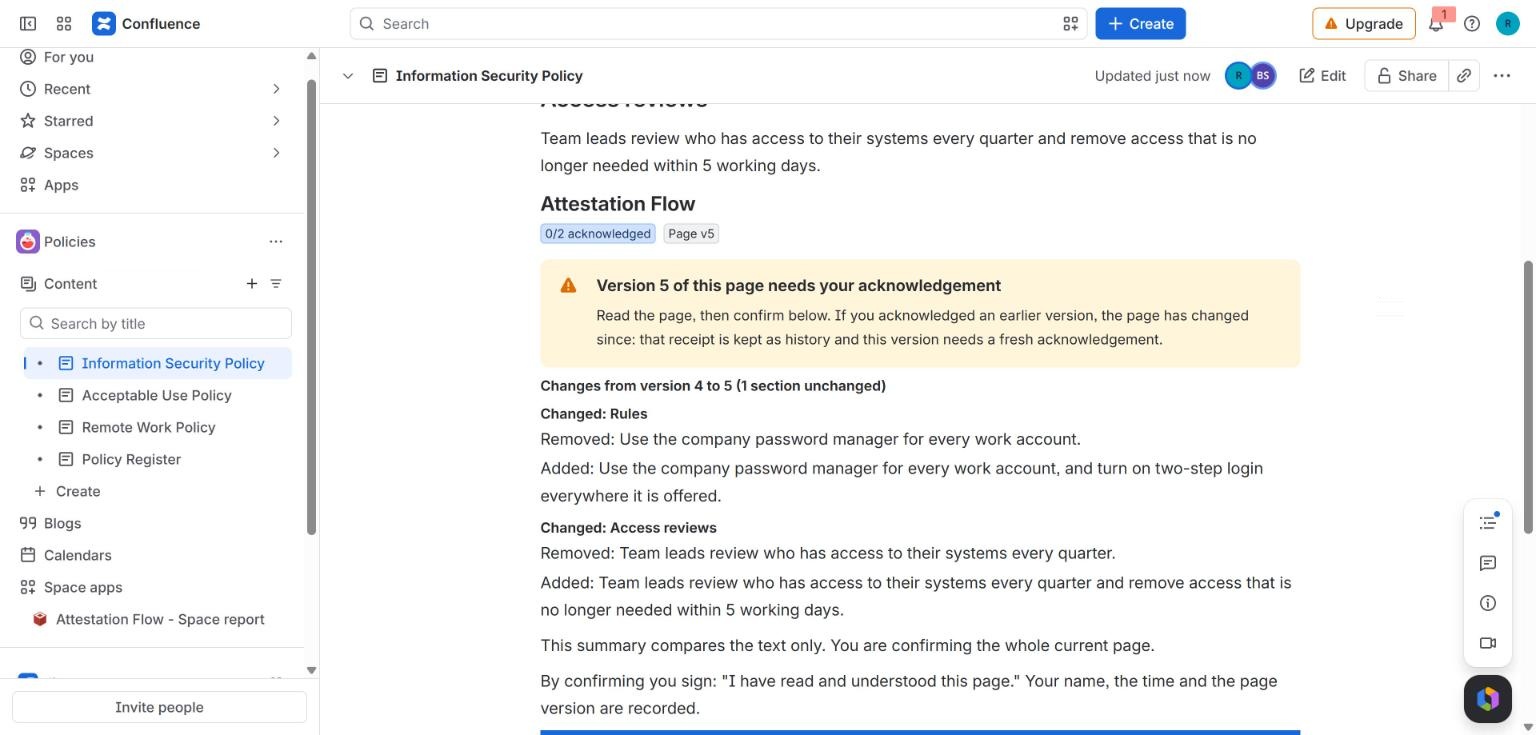
Open a page in the editor, type / and choose the macro called Attestation Flow, then publish the page. The page now shows a box with the button Require acknowledgement. Click it and the editor opens inside the box. You name the people (or Confluence groups) who must read the page, optionally set a due date and start from one of the policy packs, then click Save. The box header then shows a count such as "0/2 acknowledged" and the page version, for example "Page v5".
Group membership is read live, so people added to a group later are required automatically.
3. Optional: a default for a whole space
A space can have a default requirement that you apply to its pages, so you do not set up every page by hand. It lives on the space's own app page.
For the reader
#1. Open the page and read the box
The page carries a box titled Attestation Flow. If your confirmation of the current version is missing, a yellow message says so: "Version 5 of this page needs your acknowledgement." If you confirmed an earlier version, the message adds that the page has changed since, that your old receipt is kept as history and that this version needs a fresh one.
2. See what changed
If you confirmed an earlier version, the box shows what changed since then: for each section that changed, the lines that were removed and the lines that were added. It compares text only and says so: you are confirming the whole current page, not the summary.
3. Confirm
Under the changes the box says what you sign: "I have read and understood this page. Your name, the time and the page version are recorded." Click the button, I have read and understood version 5, and your receipt is saved. Nobody can edit a receipt afterwards.
When the page is edited again, the count starts again for the new version and you are asked again. The earlier receipts stay as history.
For the person who has to show who is outstanding
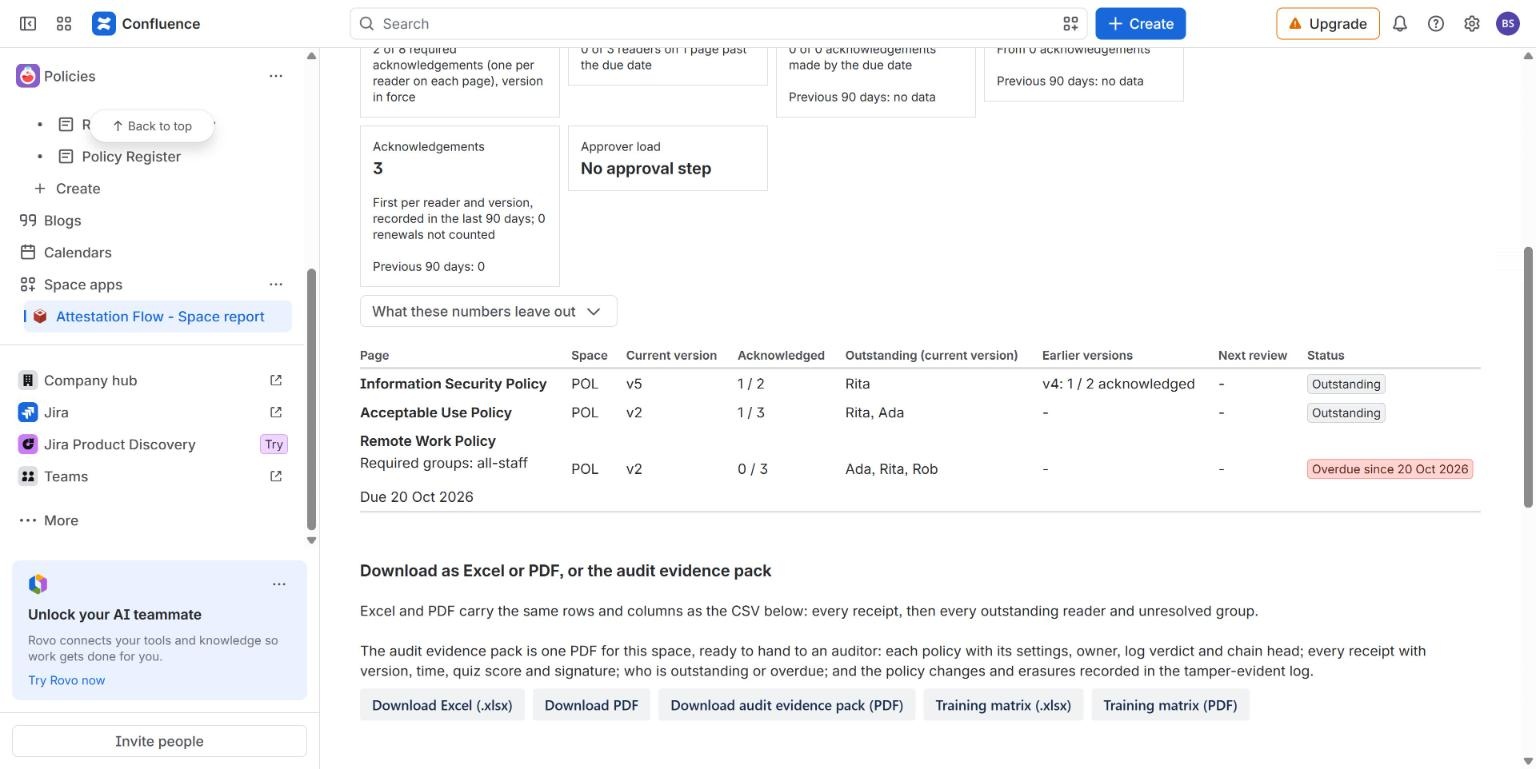
#The space report lists each policy page in a space with its current version, how many readers have confirmed, who is still outstanding and a status. It also keeps the earlier versions in view: here version 4 of the Information Security Policy shows "1 / 2 acknowledged". A page past its due date is labelled Overdue since that date.
Under the table you can download the report as Excel or PDF, an audit evidence pack (one PDF for the space, with each policy, its settings and its receipts), and a training matrix. The evidence pack is a record of what people confirmed; it is not a ruling on any regulation.
What we have not shown live yet
#These exist in the app, but we have not run them on a live site for this page, so we do not describe them in detail: periodic review, courses, a quiz or minimum reading time before confirming, the signature PIN and the authenticator code, and the Rovo agent tools. Approving each version before readers are asked is shown live only as far as the approval step: on our production test site an approver sees "Version 3 is awaiting approval", the Signature PIN field, Approve version 3 and Reject; an approval click has not been run live yet. The documentation describes all of these as the code behaves. Reminder comments are not shown here either.
What it costs
#Free, with every feature, for sites with up to 10 users. Pricing is graduated, like income tax: the first 100 users are charged at the 1-100 rate, the next 150 at the 101-250 rate and so on, so one more user never makes the total smaller. For example, 250 users cost 100 x $0.75 + 150 x $0.55 = $157.50 per month.
| Team size | Per month | Per year (10 x monthly) |
|---|---|---|
| 10 users (free tier) | $0.00 | $0.00 |
| 50 users | $37.50 | $375.00 |
| 100 users | $75.00 | $750.00 |
| 101 users | $75.55 | $755.50 |
| 250 users | $157.50 | $1,575.00 |
| 500 users | $220.00 | $2,200.00 |
All prices are in USD, list prices through the Atlassian Marketplace. The full table of bands is on the pricing page.
Related
#- Attestation Flow for Confluence documentation: every feature and setting
- Pricing: every band, with examples from 10 to 500 users
- Attestation Flow compared with other Confluence apps
- Confluence policy templates