Guide · Jira
ISO 27001 change management evidence in Jira: what to keep for Annex A 8.32
Approval Flow for Jira 3.0.0 is the production version (30 October 2026). Last updated 1 November 2026. On the Atlassian Marketplace.
By Bartosz Stankiewicz, founder, Stanki Guild.
An auditor picks three recent changes and asks to see them. For each one you should be able to show who asked, what was assessed, who approved, what was checked before and after, and when it happened, from records nobody could quietly edit afterwards. That is the practical question behind Annex A control 8.32, Change management, in ISO/IEC 27001:2022. Jira can hold most of those records. This guide says which, how far the native tools go, and where our apps fit.
The short answer: build the change as one Jira work item that carries the whole story, make the approval and the checks things the workflow enforces rather than things people remember, and export the records before the audit. Then ask your auditor what they will sample, because they decide what is enough.
What the control asks for
#ISO/IEC 27001:2022 is a paid standard and we have not reproduced its text here. We have not quoted the control wording either: the standard's own text is paywalled, and we found no free source we could confirm word for word. The edition is listed by ISO at ISO/IEC 27001:2022 (Edition 3, published 2022-10). In our words, control 8.32 is about changes to systems and the facilities that process information: they should go through a defined change management procedure, so that security is preserved while the change is made. Your Statement of Applicability says whether and how it applies to you. The guidance on implementing it sits in the companion standard ISO/IEC 27002:2022, which is also paid.
What the auditor does with that is sample. One compliance vendor's page puts it this way: "auditors will sample recent change tickets to verify the process is followed in practice, not just defined in theory." That page is a vendor's description, not the standard, and we cite it only for that sentence. The same page lists evidence an auditor may look at (a change policy, a request template with risk and rollback fields, completed tickets with request, approval, test and deployment dates, review records for high-risk changes, test results, post-implementation review). Treat that as a reasonable list to check your own process against, not as a requirement.
The records, per change
#A change record that survives sampling usually has these things. Which ones your auditor insists on is theirs to say.
- Who asked, when, and why.
- What is changing and what could go wrong (impact, risk).
- Who approved, when, and that it was someone with the authority to. A requester approving their own change is the weak spot most processes have.
- What was checked before it went ahead: tests, backup, rollback plan, who was told.
- Who implemented it and when.
- What was checked afterwards, and whether the change worked or was rolled back.
- Where the procedure or runbook changed because of it, and that the people who need to know have read the new version.
- An emergency path, with the reason the normal path was skipped.
What native Jira gets you
#Start here, because it costs nothing extra and parts of it are enough.
- One work item per change in a Jira project or a Jira Service Management request type, with required fields for description, risk, planned date and rollback plan. In company-managed projects a workflow validator can make a field required on a transition.
- A workflow such as Requested, Assessed, Approved, Implemented, Closed, where who may move a change to Approved is limited by a workflow condition or a permission.
- The history tab of the work item shows who changed which field and when, and the Jira audit log shows administrative actions. How long Atlassian keeps what depends on your plan, so check it for your site before you promise an auditor a time span.
- A saved filter and a CSV export for the changes in a period. That is your sampling list.
Where it gets thin on Standard:
- Approvals. For Jira work items, Atlassian's support page says "The approvals feature is only available on Premium editions in Jira." Jira Service Management has its own approval step, but Atlassian's tracker has a request, JSDCLOUD-6988 (493 votes, status "Gathering Interest" on 30 October 2026), that approval steps should not skip workflow validators. Test your own workflow.
- Change features in Jira Service Management. Atlassian moved the change work category, change queues, change calendar and automated risk assessments to Premium and Enterprise. The sourced details are on the toolkit page.
- A blocking checklist. A text list in a description does not stop a transition, and Jira cannot tell which lines are ticked.
- Records that cannot be edited. A person with edit rights can change a field, and the history shows it. Whether that is enough is a conversation with your auditor.
Premium is a legitimate answer to several of these. If you can use the native change features, do.
Where our apps fit
#We make Checklist Flow, Approval Flow and Attestation Flow, so weigh this as a vendor's view. Each is free, with every feature, for sites with up to 10 users.
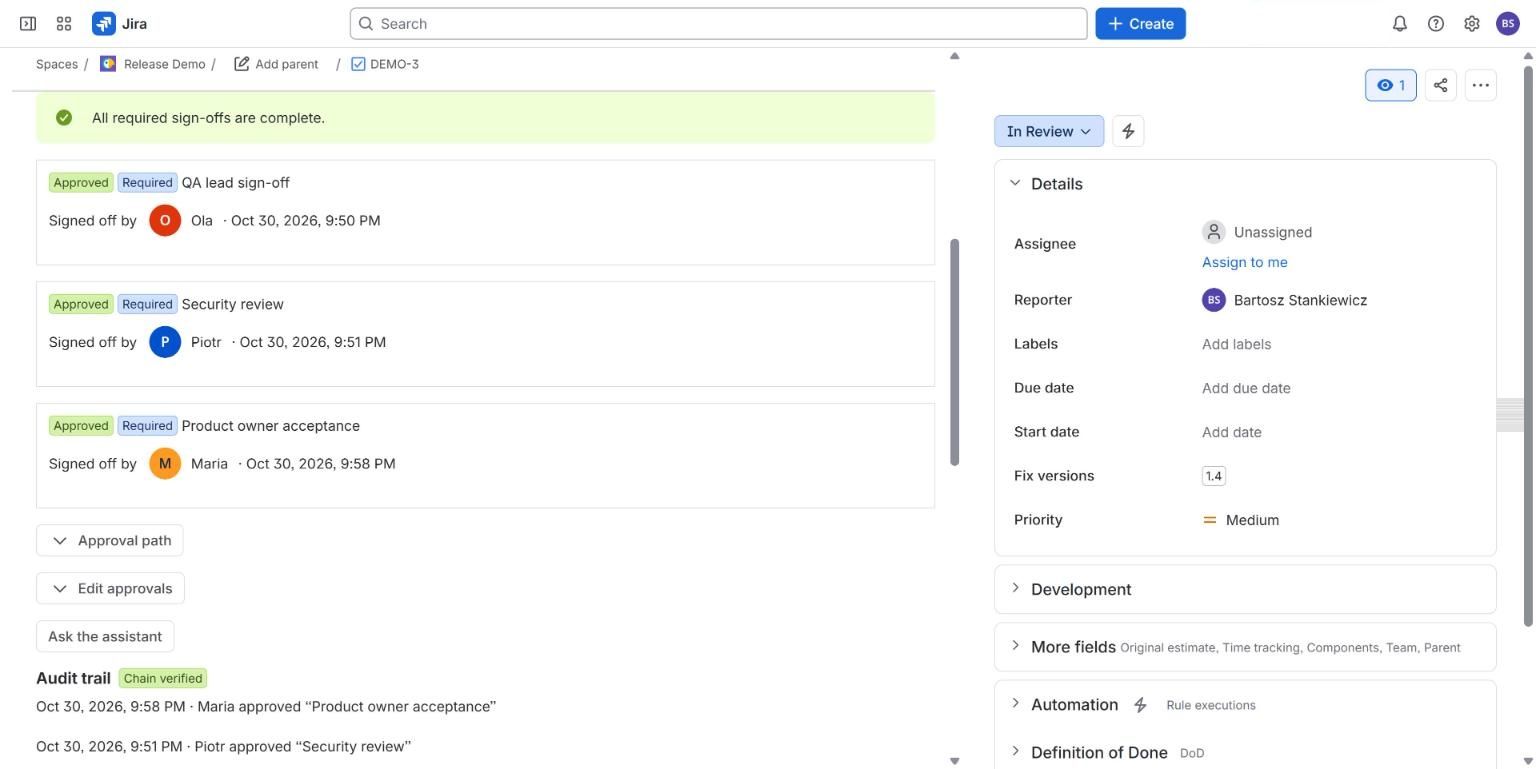
- Approval Flow records named approvers, a quorum, sequential stages and a reason for every rejection on the work item, and its validator blocks the transition until every required sign-off is in. With separation of duties on, the person who created a requirement cannot approve it, and a requirement added automatically cannot be approved by the reporter. Each decision goes into a hash-chained audit trail that exports as CSV and JSON. An approval certificate and an evidence pack for a JQL search are paid features.
- Checklist Flow puts the pre-change and post-change checks on the work item as required items that block the transition, with a hash-chained history that no role can clear inside the app.
- Attestation Flow covers the runbook: named people confirm a specific page version in Confluence, and are asked again when it changes.
Together they give you three sets of exportable records for one change: the approval trail, the checklist history and the runbook acknowledgements. There is no combined evidence pack. The full process is on the change control toolkit page, with what each app covers and what none does.
What we have not shown live yet
#We have not run this on a Jira Service Management Standard site with a change request type, and we have not had the records reviewed by an auditor. We hold no ISO 27001 certification and our apps do not make anyone compliant with ISO 27001: they produce records, and whether a record satisfies a control is for you and your auditor to decide. This is not legal or audit advice.
Common questions
#Does ISO 27001 require approvals in Jira?
No. ISO/IEC 27001 does not name Jira or any tool. Control 8.32 is about having and following a change management procedure; how you record approval is your choice, and the auditor judges whether your records show the procedure was followed.
What will an auditor sample for change management?
Usually a handful of recent changes, followed from request to close. The sample size and what they look for are the auditor's to decide, so ask in advance and check your own sample first.
Can Jira alone produce this evidence?
Partly. A work item per change, required fields, a workflow and a CSV export give you a sampling list and most of the record. What native Jira Standard lacks is an approval step with named approvers, a quorum and separation of duties for Jira work items, and a checklist that blocks a transition. Premium or an app fills those gaps.
Do your apps make us ISO 27001 compliant?
No. They produce records. We hold no ISO 27001 certification, and compliance is a judgement for you and your auditor.
Related
#- Approval Flow for Jira documentation
- Jira approval templates
- Approval Flow compared with other Jira apps
- Jira sign off: how to require a sign-off before a work item moves on
- Multiple approvers in Jira without Jira Service Management: 3 ways compared
- Which Jira and Confluence plans include approvals
- Jira approval workflow example: a purchase approval with three spend tiers
- Jira approval step skips the workflow validator: what you can do
- Jira: require a comment when someone approves or declines
- Jira approval: 50% plus one when the approver group keeps changing
- Jira approvals when the approver is out of office
- Jira approval reminders that repeat until the approver acts
- Release approval in Jira: what exists before a version is released
- Jira release approval process: how to record who approved a release and when
- Is a Slack approval valid audit evidence? What to record in Jira instead
- NIS2 and change control in Jira: what to record
- Jira approvals in Slack, Microsoft Teams and e-mail, without losing who decided
- Approval Flow with ScriptRunner for Jira Cloud: read approval status in scripts
- How we test approval rules in Jira: a million random cases a night
- Our nightly tests went red on the first run. The app was right.