Guide · Jira
Which Jira and Confluence plans include approvals
Approval Flow for Jira 3.0.0 is the production version (30 October 2026). Last updated 1 November 2026. On the Atlassian Marketplace.
By Bartosz Stankiewicz, founder, Stanki Guild.
"Do I have to upgrade to get approvals?" depends on which product you mean. The answer is different for Jira work items, for Jira Service Management requests and for Confluence pages, and Atlassian's own pages do not all use the same wording.
The short answer: for Jira work items, Atlassian's support page says approvals are only available on Premium editions, so Jira Standard has no native approval step for them. Jira Service Management is different: Atlassian's plan comparison lists multi-user approvals from Standard. A Confluence page on Standard has no native page approval. On Standard you can build fields and a validator yourself, upgrade, or use a Marketplace app (Approval Flow is ours).
What Atlassian's pages say
#| Where | What the page says | Source |
|---|---|---|
| Jira work items (Jira Software, Work Management) | "The approvals feature is only available on Premium editions in Jira." | What are approvals? |
| Jira team-managed business projects | Approvals are available for "Jira Cloud Premium and Enterprise licenses" | Troubleshoot approvals in business projects |
| Confluence pages | "Approvals are available only on Premium and Enterprise plans." Approvals work on pages: "Approvals are supported on pages, but not on live docs or blog posts." | Request and manage approvals in Confluence |
| Jira Service Management requests | The plan comparison on Atlassian's JSM Premium page lists "Multi-user/group approvals" as included in all three plan columns it shows, Standard, Premium and Enterprise | JSM Cloud Premium |
All four pages were read on 30 October 2026. The two Jira support pages word the plans differently (Premium, or Premium and Enterprise), so write "Premium or higher" when you quote them. The JSM row is our reading of a comparison table whose cells our text copy cannot place exactly; open the page and look at the row before you rely on it.
The same fact in Atlassian's tracker: JRACLOUD-62053, the request for approvals in Jira Software and Work Management workflows, has 586 votes, the status "Gathering Interest", and has been open since 2016-07-27.
So what do you do on Standard?
#Be exact about what is missing. A Jira Software work item on Standard has no native approval step. A Jira Service Management project on Standard does have multi-user approvals, according to the table above. A Confluence page on Standard has no native page approval.
For Jira work items you have three options, compared in Multiple approvers in Jira without Jira Service Management: fields and a validator you build yourself, an upgrade to Premium, or a Marketplace app.
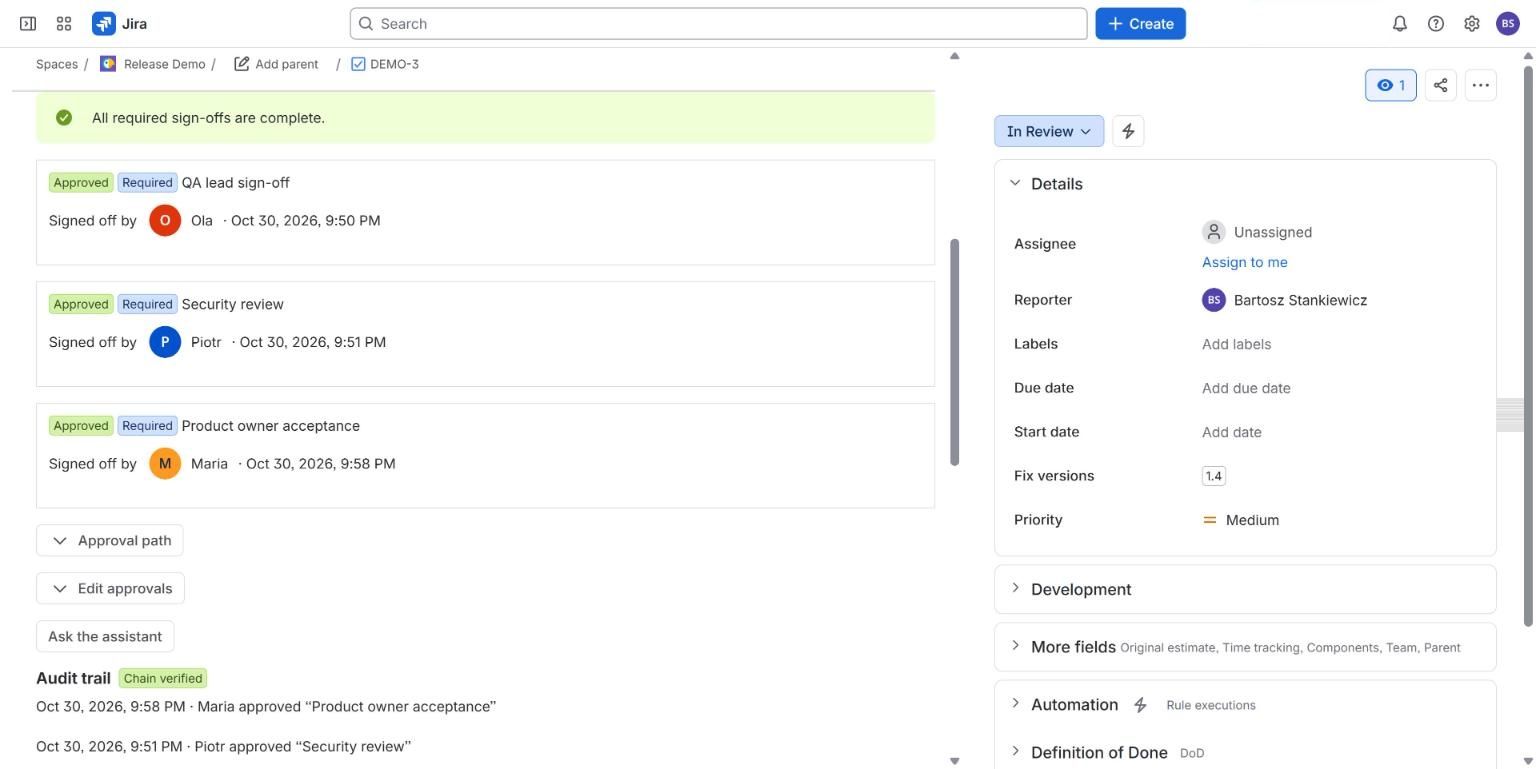
Approval Flow is one of those apps. It keeps a list of required sign-offs on a Jira work item, blocks the transition with a workflow validator until they are in, and keeps an audit trail of who decided and when. Its licence is its own: free up to 10 users with every feature, and priced per user above that (see pricing).
For Confluence pages, Attestation Flow is the other direction: it tracks who has read and confirmed a page version, and, with a paid licence, can require approval of a version before readers are asked.
What we have not shown live yet
#The screenshot is from a live Jira Cloud site. We have not tested Approval Flow on a Jira site that is on the Standard plan, so confirm it in a trial before you rely on it. The Confluence approval of versions is described in the documentation and not shown live.
Common questions
#Does Jira Standard have approvals?
For Jira work items, Atlassian's support page says approvals are only available on Premium editions. For Jira Service Management, Atlassian's plan comparison lists multi-user approvals from Standard. Read both pages for your project type.
Can I get approvals in Jira without Premium?
Not natively for Jira work items: Atlassian's support page says approvals are only available on Premium editions. The alternatives are fields and a validator you build, or a Marketplace app. Approval Flow is one; we have not tested it on a Jira site on the Standard plan, so confirm it in a trial.
Does Approval Flow replace Atlassian's approvals on Premium?
It is an alternative. If you are on Premium already, native approvals may be enough; the open requests in Atlassian's tracker (comment on decision, delegation, reminders, validators) are the gaps people hit.
Related
#- Approval Flow for Jira documentation
- Jira approval templates
- Approval Flow compared with other Jira apps
- Jira sign off: how to require a sign-off before a work item moves on
- Multiple approvers in Jira without Jira Service Management: 3 ways compared
- Jira approval workflow example: a purchase approval with three spend tiers
- Jira approval step skips the workflow validator: what you can do
- Jira: require a comment when someone approves or declines
- Jira approval: 50% plus one when the approver group keeps changing
- Jira approvals when the approver is out of office
- Jira approval reminders that repeat until the approver acts
- Release approval in Jira: what exists before a version is released
- Jira release approval process: how to record who approved a release and when
- Is a Slack approval valid audit evidence? What to record in Jira instead
- ISO 27001 change management evidence in Jira: what to keep for Annex A 8.32
- NIS2 and change control in Jira: what to record
- Jira approvals in Slack, Microsoft Teams and e-mail, without losing who decided
- Approval Flow with ScriptRunner for Jira Cloud: read approval status in scripts
- How we test approval rules in Jira: a million random cases a night
- Our nightly tests went red on the first run. The app was right.