Guide · Jira
Jira approval step skips the workflow validator: what you can do
Approval Flow for Jira 3.0.0 is the production version (30 October 2026). Last updated 1 November 2026. On the Atlassian Marketplace.
By Bartosz Stankiewicz, founder, Stanki Guild.
You added a validator to a transition, then added an approval step to the status, and the work item moved on without the validator ever running. If that is what you see, you are not alone: Atlassian's own tracker has a request about exactly this.
What Atlassian says
#The request is JSDCLOUD-6988, "Approval steps should not bypass workflow validator". When we read it on 30 October 2026 it had 493 votes, the status "Gathering Interest" and had been open since 2018-10-16. The reporter writes: "As a Jira Service Management Administrator, I would like to add validators to approval steps without having them bypassed by the approval transition."
Two things to note. The ticket is filed against Jira Service Management, so it describes JSM approval steps. And Atlassian's support page for approvals in Jira work items says you "can add an approval step to any status in a company-managed project's workflow"; the page text we saved on 30 October 2026 does not mention validators at all, so do not assume the Jira work item version behaves differently. Test it in your own workflow.
How a Forge validator behaves
#A validator is checked when someone performs a transition. Atlassian's Forge documentation says: "If a validator fails, the work item does not progress to the destination status of the transition, the transition's post functions are not executed, and the error message of the failed validator is shown." Our reading of the ticket is that it concerns the transition the approval step performs for you once the approvers have decided, which is not a transition a person clicks.
A workaround you can test: gate the next transition
#If the automatic transition skips your validator, put the validator on a transition that a person performs after it. The idea, in three steps:
- Let the approval step do its job and move the work item to a status such as "Approved".
- Add your validator to the next manual transition, for example from "Approved" to "Released".
- Try it: with the condition unmet, the manual transition should be refused and show the validator's message.
A reply in an Atlassian Community thread on multi-level approvals describes the same split: the approval step decides that the record can move on, a validator on the next transition then stops it getting further. That is one practitioner's description, not an Atlassian recommendation.
Where this breaks: the approval is recorded before your condition is checked, so a work item can sit in "Approved" with the condition unmet. It only stops the next step. If you need the sign-off itself to depend on the condition, this does not do it.
Option: Approval Flow, where the gate is the validator
#Approval Flow does not change Jira's approval step. It adds its own list of required sign-offs to a work item, and its workflow validator Approval sign-off required blocks the transition you attach it to until every Required sign-off is in. If the check itself cannot be completed, the transition is blocked rather than let through. A work item with no sign-offs is never blocked.
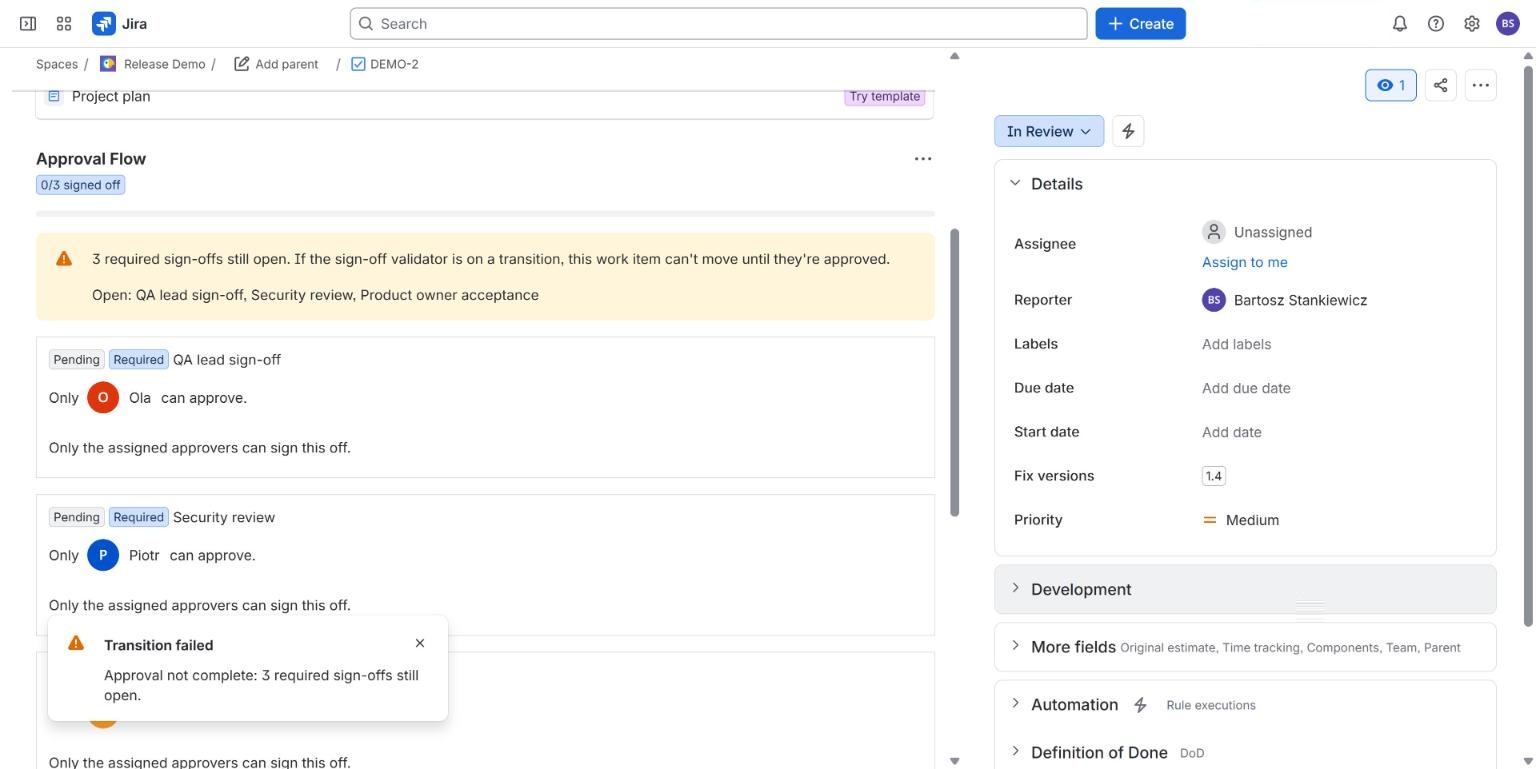
Because the gate is a validator on a transition people perform, it fits the workaround above in principle: use Jira's approval step if you like it, and let Approval Flow decide whether the next transition may happen. We have not tested the two together on a Jira Service Management project, so check that combination on a copy of your workflow first.
What we have not shown live yet
#The blocked transition above was run on a live Jira Cloud site. We have not shown live that the check fails closed when Jira cannot answer, and we have not run the validator on a team-managed project. Both are described in the documentation as the code behaves. We have not tested Approval Flow beside Jira's own approval step.
Common questions
#Does Approval Flow fix JSDCLOUD-6988?
No. That ticket asks Atlassian to change how its approval step treats validators. Approval Flow is a separate list of sign-offs with its own validator, so it gives you a gate you control. It does not change what Jira's approval step does.
Do I need Jira Premium for this?
Not for Approval Flow. Native approvals in Jira work items need a higher plan, see which plans include approvals.
Can the person who raised the work item approve it?
Only if separation of duties is off for that work item. With it on, the person who added a requirement cannot approve it.
Related
#- Approval Flow for Jira documentation
- Jira approval templates
- Approval Flow compared with other Jira apps
- Jira sign off: how to require a sign-off before a work item moves on
- Multiple approvers in Jira without Jira Service Management: 3 ways compared
- Which Jira and Confluence plans include approvals
- Jira approval workflow example: a purchase approval with three spend tiers
- Jira: require a comment when someone approves or declines
- Jira approval: 50% plus one when the approver group keeps changing
- Jira approvals when the approver is out of office
- Jira approval reminders that repeat until the approver acts
- Release approval in Jira: what exists before a version is released
- Jira release approval process: how to record who approved a release and when
- Is a Slack approval valid audit evidence? What to record in Jira instead
- ISO 27001 change management evidence in Jira: what to keep for Annex A 8.32
- NIS2 and change control in Jira: what to record
- Jira approvals in Slack, Microsoft Teams and e-mail, without losing who decided
- Approval Flow with ScriptRunner for Jira Cloud: read approval status in scripts
- How we test approval rules in Jira: a million random cases a night
- Our nightly tests went red on the first run. The app was right.