Guide · Jira
Jira: require a comment when someone approves or declines
Approval Flow for Jira 3.0.0 is the production version (30 October 2026). Last updated 1 November 2026. On the Atlassian Marketplace.
By Bartosz Stankiewicz, founder, Stanki Guild.
Auditors and change boards often want the reason next to the decision: why was this approved, why was it declined. In Jira you can ask for it, but you cannot make the Approve and Decline buttons insist on it.
What Jira does natively
#Atlassian's support page describes the flow like this: the approvers "approve or decline the work item directly within Jira, adding any necessary comments or feedback". The comment is optional by design.
There are two open requests in Atlassian's tracker to change that, read on 30 October 2026:
| Request | Applies to | Votes | Status | Open since |
|---|---|---|---|---|
| JSDCLOUD-6989, Ability to display screens on Approve/Deny Service Desk Transitions | Jira Service Management | 744 | Gathering Interest | 2018-10-16 |
| JRACLOUD-96793, approvers should get a pop-up to capture comments | Jira company-managed projects | 18 | Gathering Interest | 2025-11-24 |
The same question came up in the Atlassian Community: How can we require mandatory approver comments while still using the native Approvers field in Jira (760 views, 2 comments when we read it). One reply says there is "no supported way to display a transion screen or enforce a mandatory comment / field as part of built-in Approve/Decline Action". That is a community member's answer, not an Atlassian statement, but it matches the two open requests. The same thread has a reply from a vendor describing an app prototype that adds its own approval action.
Workarounds with native approvals
#- Agree it as process. Ask approvers to comment and check it in your change review. Nothing enforces it.
- Detect afterwards. An Automation rule could flag an approved work item with no comment. That tells you after the decision, it does not stop it.
Where this breaks: both leave a window in which a decision exists without a reason, and an audit finding is possible.
Option: a requirement that needs a comment
#In Approval Flow (paid), you tick Approvers must add a comment on a requirement. The requirement then shows a Comment required lozenge, and clicking Approve opens a comment field. The button records nothing while the field is empty. The comment can be up to 500 characters and is stored with the sign-off, in the audit trail and in the exported CSV (column note).
Details that matter to an auditor:
- A missing comment is refused before the signature PIN is checked, so no PIN attempt is used and nothing is recorded.
- A substitute approving on someone's behalf must add the comment too.
- On the My approvals page one comment field serves a batch: it is required when any selected sign-off needs one.
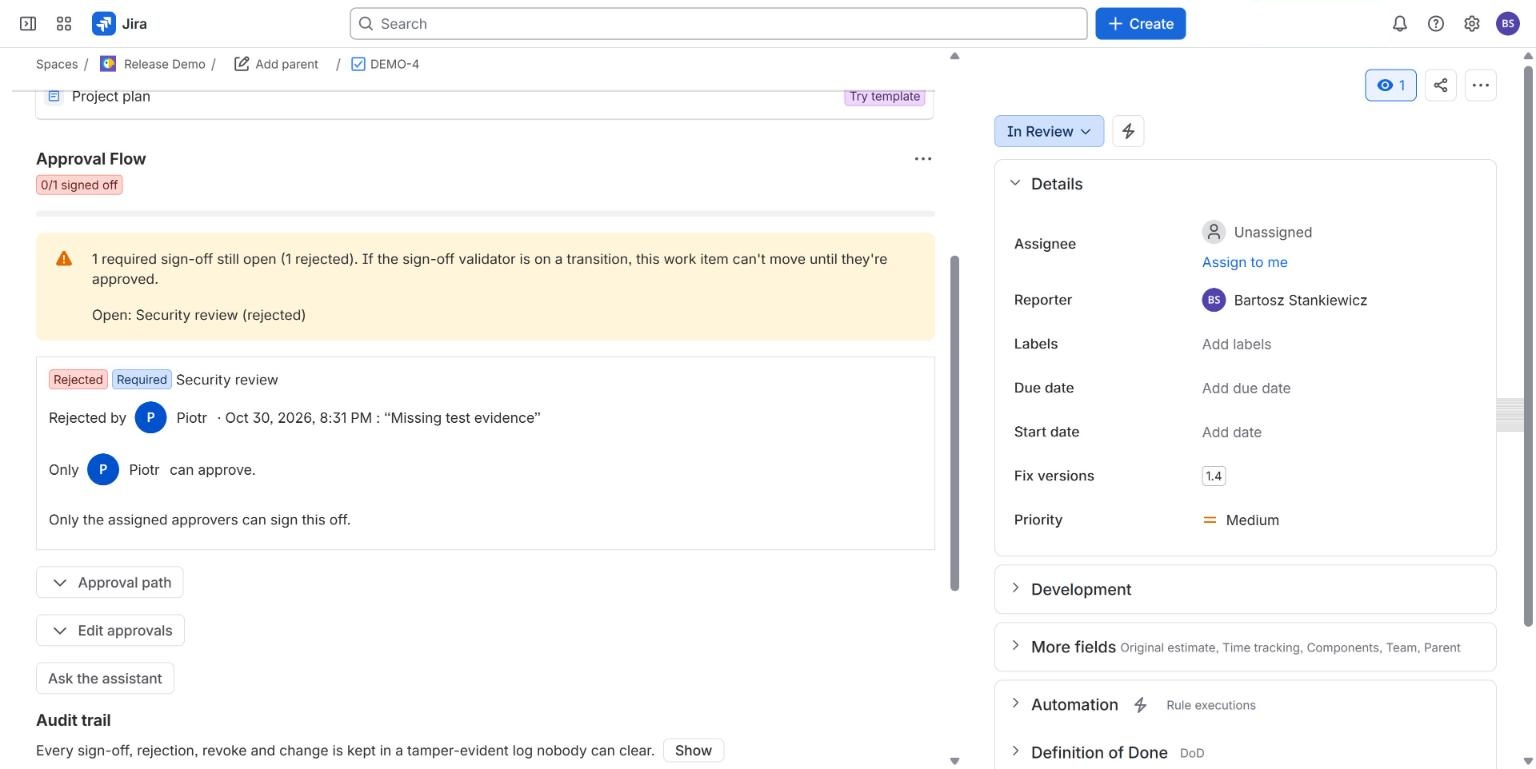
- Declining already requires a reason in every edition.
This is per requirement, so you choose which sign-offs need a written reason. It does not change Jira's own Approve and Decline buttons: it applies to Approval Flow's sign-offs.
What we have not shown live yet
#The comment requirement is described in our documentation and covered by our tests. We have not recorded it on a live site for this page. The rejection reason was shown live.
Common questions
#Is a comment required to decline?
Yes. Approval Flow asks for a reason when you decline, in every edition, and the reason is shown on the sign-off.
Does it work for Jira Service Management approvals?
No. It works for the sign-offs Approval Flow keeps on a work item. Jira Service Management's own approval step is a separate feature that the app does not change.
Related
#- Approval Flow for Jira documentation
- Jira approval templates
- Approval Flow compared with other Jira apps
- Jira sign off: how to require a sign-off before a work item moves on
- Multiple approvers in Jira without Jira Service Management: 3 ways compared
- Which Jira and Confluence plans include approvals
- Jira approval workflow example: a purchase approval with three spend tiers
- Jira approval step skips the workflow validator: what you can do
- Jira approval: 50% plus one when the approver group keeps changing
- Jira approvals when the approver is out of office
- Jira approval reminders that repeat until the approver acts
- Release approval in Jira: what exists before a version is released
- Jira release approval process: how to record who approved a release and when
- Is a Slack approval valid audit evidence? What to record in Jira instead
- ISO 27001 change management evidence in Jira: what to keep for Annex A 8.32
- NIS2 and change control in Jira: what to record
- Jira approvals in Slack, Microsoft Teams and e-mail, without losing who decided
- Approval Flow with ScriptRunner for Jira Cloud: read approval status in scripts
- How we test approval rules in Jira: a million random cases a night
- Our nightly tests went red on the first run. The app was right.