Guide · Jira
Release approval in Jira: what exists before a version is released
Approval Flow for Jira 3.0.0 is the production version (30 October 2026). Last updated 1 November 2026. On the Atlassian Marketplace.
By Bartosz Stankiewicz, founder, Stanki Guild.
Update, 1 November 2026: a Jira user reported in the Atlassian Community that Jira now offers a "Require approvals before moving to Released" option in the Create release dialog, which blocks the release until the approvers approve, and that it can only be turned on when the release is created (thread). The same user later reported seeing it on Jira Standard, in the Create release dialog but not in Edit release, and thinks it is a staged rollout rather than a plan limit. Our own Jira Free test site does not show this option, and we found no Atlassian documentation for it yet, so check what your plan shows before you rely on the workaround below.
Someone has to sign before a version is released: the product owner, QA, security. In Jira you click Release on the version, and Jira does not ask anyone.
The short answer: on our Jira Free test site Jira has no approval step for releasing a version (JRACLOUD-92893, open since 2017; see the update above for a newer native option on some sites), and we found no way for a Forge app to block the Release button. What works today is a process control: model the release as a work item, collect the sign-offs there with a validator on the go transition, and release the version only afterwards. Nothing stops a person with permission from clicking Release anyway.
What Atlassian says
#The request is JRACLOUD-92893, "Add a approvals feature for when releasing versions.". On 30 October 2026 it had 185 votes, the status "In Progress" and had been open since 2017-10-24. A newer request to release a version only when all approvers have approved (JRACLOUD-98080) now has the status "Closed".
Atlassian's native approvals attach to a status in a workflow, as their support page says: you "can add an approval step to any status in a company-managed project's workflow". A version is not a work item and has no workflow, so that does not cover a release.
What apps can and cannot do
#We looked at what Forge, the platform our apps run on, offers.
- A Forge workflow validator works on transitions of work items. Atlassian's documentation describes it as checking input "before the transition is performed".
- The list of Jira modules in Forge's documentation (read 30 October 2026) has no module for versions or releases.
- Forge can listen to version events. The events reference lists project versions with "Track release management lifecycle (created, released, archived, merged)". That tells an app that a release happened. It does not let the app say no beforehand.
So no app built on Forge can block the Release button on a version. Treat any listing that promises to block it with care, and ask the vendor how.
A pattern that works today: a release work item
#Model the release as a work item, for example a "Release" issue in a release project, and put the control on its workflow:
- Create the release work item with the sign-offs you need (QA, security, product owner).
- Attach the Approval Flow validator to the transition that means "go": the work item cannot move until every Required sign-off is in.
- Use the work item's approval status as your go signal, and only then release the version in Jira.
The sign-offs, who approved and when, and the audit trail are kept on the release work item. Approval Flow's template library includes a release go/no-go policy.
Where this breaks: nothing stops a person with permission from clicking Release on the version without looking at the release work item. This is a process control backed by a record, not a technical block.
See readiness per version
#Checklist Flow (paid) has a Release readiness tab on its DoD Health page. You pick a fix version and it answers Go, No-go or Not known, with the reasons: work items with open Required checklist items, a release checklist that is still open, and, where Approval Flow is installed, approvals that are pending or rejected. What it cannot confirm is listed as Not known and is never counted as Go. The screenshot is from a live Jira Cloud site with demo data.
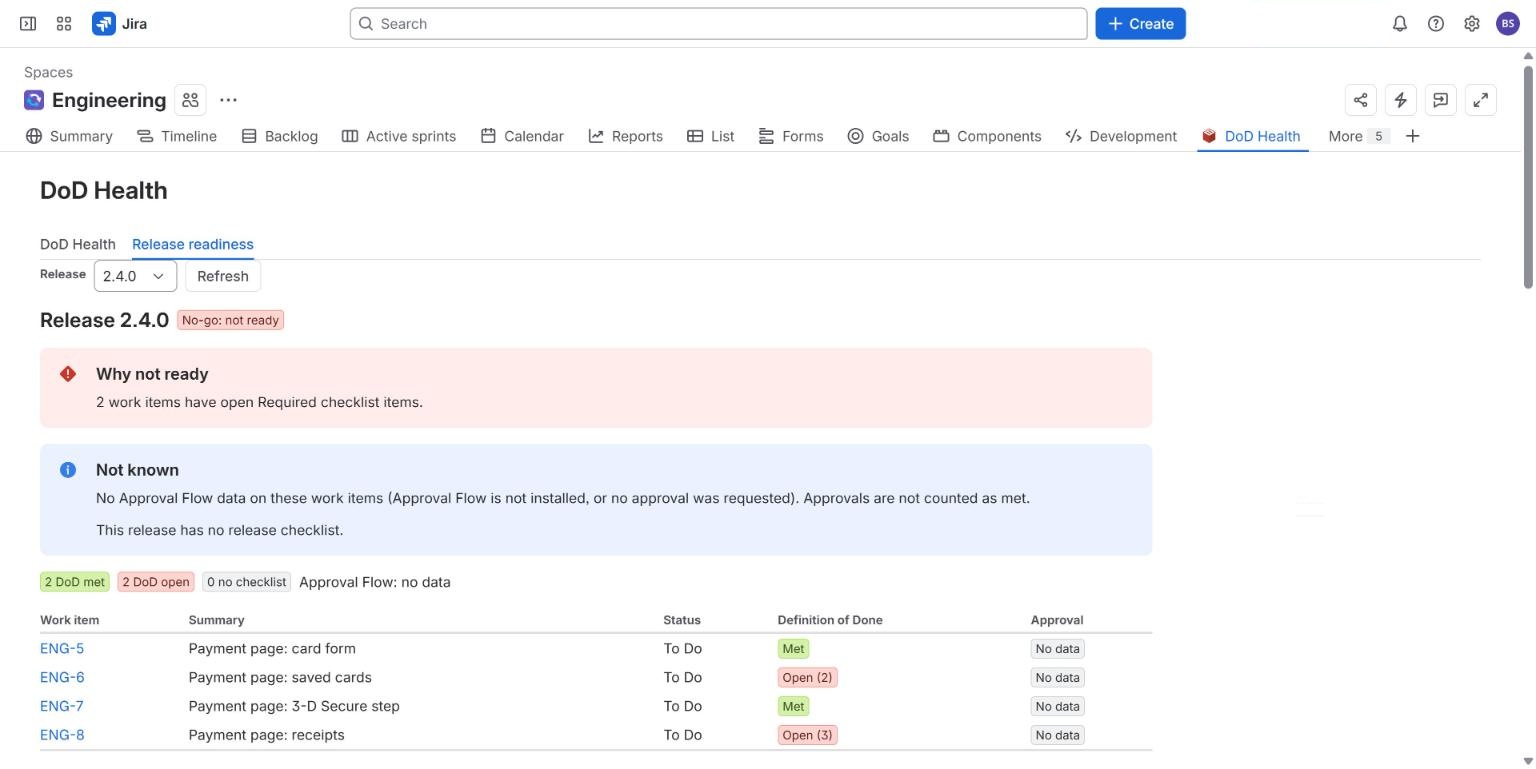
It reports; it does not stop anyone releasing.
What we have not shown live yet
#We have not built or tested a sign-off that attaches to a version itself, and we do not claim one. Whether the version-released event fires reliably for the Release button and for Automation is not tested. The release go/no-go policy is described in the documentation and was not recorded on a live site for this page.
Common questions
#How do I get a sign-off before a Jira version is released?
Unless your site has the new "Require approvals before moving to Released" option (see the update at the top), Jira does not ask anyone when you click Release. Put the sign-offs on a release work item, gate its go transition with a validator, and release the version after that work item has moved. It is a process control backed by a record, not a technical block.
Can any app block the Release button?
We found no way to do it with Forge. If you find an app that claims it, ask how it works and whether it survives Atlassian changing the Releases page.
Is a warning after an unapproved release possible?
In principle: an app can see the release event and flag it. We have not built that.
Related
#- Approval Flow for Jira documentation
- Jira approval templates
- Approval Flow compared with other Jira apps
- Jira sign off: how to require a sign-off before a work item moves on
- Multiple approvers in Jira without Jira Service Management: 3 ways compared
- Which Jira and Confluence plans include approvals
- Jira approval workflow example: a purchase approval with three spend tiers
- Jira approval step skips the workflow validator: what you can do
- Jira: require a comment when someone approves or declines
- Jira approval: 50% plus one when the approver group keeps changing
- Jira approvals when the approver is out of office
- Jira approval reminders that repeat until the approver acts
- Jira release approval process: how to record who approved a release and when
- Is a Slack approval valid audit evidence? What to record in Jira instead
- ISO 27001 change management evidence in Jira: what to keep for Annex A 8.32
- NIS2 and change control in Jira: what to record
- Jira approvals in Slack, Microsoft Teams and e-mail, without losing who decided
- Approval Flow with ScriptRunner for Jira Cloud: read approval status in scripts
- How we test approval rules in Jira: a million random cases a night
- Our nightly tests went red on the first run. The app was right.